For small-to-mid food manufacturers, the best line monitoring software is a lightweight, sensor-first SaaS platform that automates PLC data capture while letting operators add context in real time. The payoff is measurable: faster mean time to repair (MTTR), less manual reporting, and OEE visibility that actually drives decisions rather than sitting in a spreadsheet nobody reads. If your plant runs heavily customized batch control suites, legacy SCADA tied to proprietary hardware, or enterprise MES with deep bespoke integrations, a lightweight SaaS layer may not be your primary tool. But for most small-to-mid food operations, it is the fastest path from guesswork to data.
Table of Contents
- What does production line monitoring software actually do?
- Which features should you prioritize for your food plant?
- How do you choose the right system for your plant?
- What does deployment cost, and how long does it take?
- How to run a 90-day pilot that produces real answers
- How Gembalabs maps to what you actually need
- What makes ERP and MES integration harder than vendors admit
- Key Takeaways
- What I have learned from watching plants pick the wrong tool
- Gembalabs can get your pilot running in weeks, not months
- Useful sources and further reading
What does production line monitoring software actually do?
At its core, production line monitoring software connects to your equipment, reads machine signals, and turns raw state data into something your team can act on. Here is how that flow works in practice.
Sensors or PLC connections capture machine states continuously. The software polls equipment at high frequency, tracking whether a line is running, idle, faulted, or in changeover. Automated OEE and downtime tracking eliminates the manual entry errors that plague clipboard-based systems. From there, the platform calculates OEE (Availability × Performance × Quality), logs downtime events with timestamps, and surfaces alarms when thresholds are breached.
The human layer matters just as much. Operators annotate stops directly in the system: a jam, a sanitation hold, a safety stop. That context is what separates a timestamp from a root cause. Without it, you know a line stopped for 14 minutes. With it, you know it stopped because the filler nozzle clogged on the third SKU of the shift, which is a very different maintenance conversation.
Dashboards and reports pull everything together. Shift supervisors see live OEE. Managers get daily or weekly summaries. Maintenance teams see alarm frequency trends. The best systems let you drill from a plant-level dashboard down to a single machine event in two or three clicks.
- Automated data capture: PLCs, sensors, and IIoT devices feed machine states without manual input.
- Machine-state tracking: Running, idle, faulted, changeover, and cleaning states are logged continuously.
- Downtime logging: Every stop is timestamped; operators add reason codes and free-text notes.
- OEE calculation: Availability, Performance, and Quality roll up automatically per shift, line, and SKU.
- Operator annotations: Contextual notes tie machine events to human-readable causes.
- Dashboards and alerts: Real-time views and threshold-based alarms keep teams ahead of problems.
Which features should you prioritize for your food plant?
Not every feature on a vendor's spec sheet earns its place in a food manufacturing environment. Here is a practical prioritization framework.
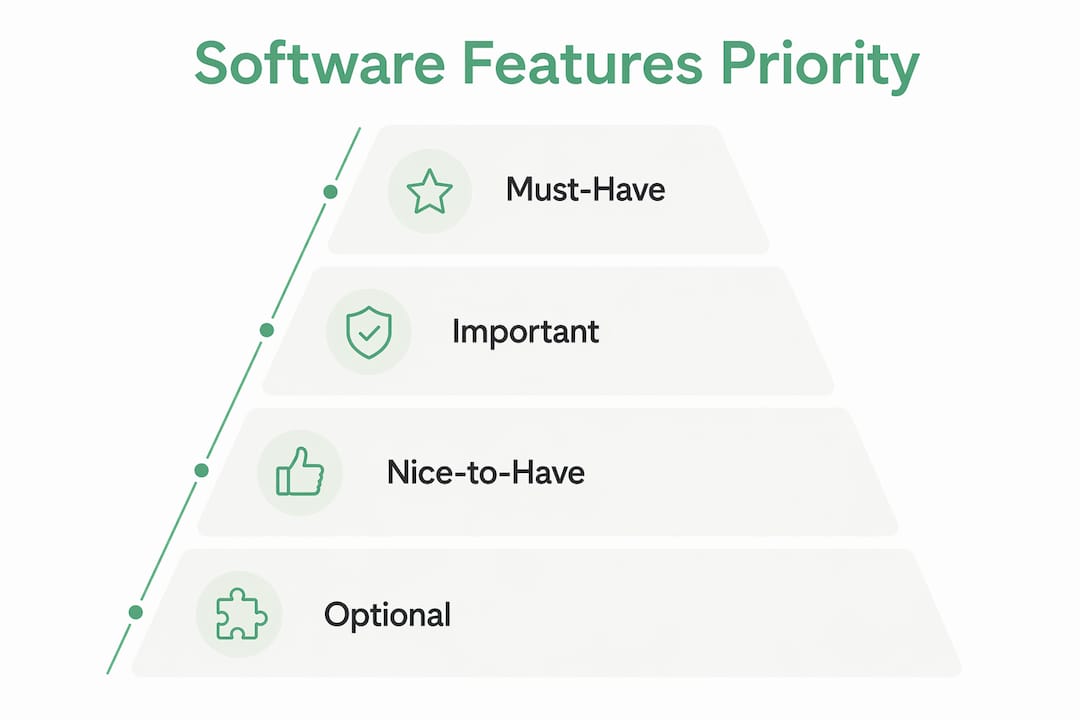
Must-have features
Real-time OEE is non-negotiable. If the system cannot show you current OEE by line and shift without a manual export, it will not change behavior on the floor. Downtime capture with reason codes is equally critical. Timestamps alone do not drive improvement. PLC and OPC-UA connectivity determines whether the software can actually talk to your equipment without a custom integration project. And operator input — the ability for line workers to annotate stops, log rework, and flag quality issues — is what gives machine data its meaning.
For food manufacturers specifically, lot and heat traceability is a regulatory requirement, not a nice-to-have. Batch traceability in food and beverage requires careful integration with production systems, and your monitoring software needs to support audit trails that hold up during an FDA inspection or a customer audit.
Important but not always day-one
Bilingual operator UI (English and Spanish) matters more than most vendors admit. In U.S. food plants, a significant share of line operators work primarily in Spanish. A system that only surfaces prompts in English gets ignored or filled in incorrectly, which corrupts your downtime data. Recipe and changeover tracking is also worth prioritizing early: knowing exactly when a changeover started, how long it ran, and whether it hit target time is often where the biggest OEE gains hide.
Pro Tip: Ask vendors to demo the operator annotation screen in Spanish before you sign anything. If they cannot show it in two minutes, it probably does not exist.

Nice-to-have at rollout
Predictive alerts and advanced analytics are genuinely useful, but they require a baseline of clean historical data before they produce reliable signals. Plan for them in month four or five of a pilot, not week one.
ISA-88 / PackML native support for packaging equipment state mapping is worth asking about if you run automated packaging lines. It standardizes machine states across equipment from different manufacturers, which simplifies reporting considerably.
How do you choose the right system for your plant?
The decision framework is straightforward: match your objectives to a shortlist, run a scoped pilot on one line, measure predefined KPIs at 90 days, then decide whether to scale. The pilot is where vendors reveal themselves. A vendor who resists a scoped pilot or cannot deploy on a single line without a six-month integration project is telling you something important.
Vendor questions to ask before you commit
- Which PLCs and communication protocols do you support natively (OPC-UA, Modbus, EtherNet/IP)?
- What is the minimum hardware required to connect to our existing equipment?
- Can we run a pilot on one line without committing to a full-plant deployment?
- How long does a typical single-line pilot take from kickoff to live data?
- Do you support on-site deployment, cloud, or both? Who owns the data?
- What happens to our data if we cancel the subscription?
- Does the operator interface support Spanish? Can we see a live demo?
- How do you handle offline buffering if our network goes down?
- What ERP and MES integrations do you support out of the box?
- Do you provide an open API for custom integrations?
- What is your SLA for support response during production hours?
- How are firmware updates on legacy PLCs handled?
- Can operators add free-text annotations, or only predefined reason codes?
- How are user roles and permissions managed?
- What audit trail and data export formats do you support for FDA or customer audits?
- How do you handle recipe or SKU changeover tracking?
- What does your onboarding and training process look like for line operators?
- Are there limits on the number of data points or events stored per line?
- What is your pricing model: per line, per device, per seat, or enterprise?
- Can you provide a reference from a food manufacturer of similar size?
Red flags to watch for
- Requires proprietary edge hardware or heavy middleware before any data flows
- Cannot show a working Spanish operator UI on request
- Vague SLAs ("we respond as quickly as possible") with no defined support windows
- No data export option or data portability clause in the contract
- Pilot requires full-plant wiring before a single line goes live
- No operator annotation capability beyond predefined dropdown codes
What does deployment cost, and how long does it take?
Timelines and costs vary by plant complexity, but the ranges below reflect what small-to-mid food manufacturers typically encounter with software-first solutions.
| Phase | Typical Duration | What Drives the Timeline |
|---|---|---|
| Scoping and vendor selection | several weeks | Number of lines, PLC types, integration requirements |
| Single-line pilot | several weeks to a few months | PLC connectivity complexity, operator training, data validation |
| Per-line rollout (post-pilot) | a few weeks per line | Standardization from pilot, IT readiness, changeover complexity |
| Full-plant steady state | several months total | Plant size, number of lines, ERP integration scope |
Software-first solutions deploy significantly faster than traditional SCADA or MES implementations, where setup is measured in months rather than weeks. That speed advantage is real, but it depends on your PLC environment being reasonably accessible.
On pricing, most production monitoring platforms use one of these models:
- Per-line subscription: A fixed monthly or annual fee per production line. Predictable and easy to budget.
- Per-device or per-sensor: Charges scale with the number of connected data points. Can get expensive on complex lines.
- Per-seat: Based on the number of users. Works well for small teams but can penalize growth.
- Enterprise subscription: Flat fee for a defined plant or facility. Common for larger rollouts.
The subscription fee is rarely the whole story. Hidden TCO often appears in the integration layer: middleware requirements, proprietary edge hardware, and the ongoing cost of maintaining those components when PLC firmware changes. A platform that charges less per month but requires a $15,000 gateway installation and a dedicated IT resource to maintain it is not the cheaper option.
Primary cost drivers to budget for: PLC integration complexity, custom API work for ERP or MES connections, any required hardware (gateways, tablets, sensors), support tier selection, and training for operators and supervisors.
How to run a 90-day pilot that produces real answers
A pilot that does not define success upfront produces opinions, not decisions. Here is a structured approach.
- Scope one line and three to five KPIs. Pick your highest-volume or most problematic line. Define what "success" looks like in numbers before the pilot starts.
- Connect PLCs and sensors. Work with the vendor to establish connectivity and validate that machine states are mapping correctly. Budget one to two weeks for this.
- Enable operator annotation. Set up reason code lists and free-text fields. Train operators in a single 30-minute session, in their preferred language.
- Capture baseline data for two weeks. Do not act on the data yet. Let it accumulate so you have a clean baseline to compare against.
- Hold weekly checkpoints. Review OEE, downtime categories, and alarm frequency each week. Adjust reason code lists if operators are using "other" more than 20% of the time.
- Adjust mappings at week six. By now, you will know which machine states are miscategorized or missing. Fix them before the final evaluation window.
- Evaluate at 90 days. Compare end-state KPIs to baseline. Make a go/no-go decision on scaling.
KPIs to track weekly during the pilot
| Metric | What to Measure | Target Direction |
|---|---|---|
| Availability | Planned production time vs. actual run time | Increase |
| Performance | Actual output vs. theoretical maximum | Increase |
| Quality | Good units vs. total units produced | Increase |
| MTTR | Average time from fault detection to line restart | Decrease |
| Alarm frequency | Number of threshold alerts per shift | Decrease over time |
| Annotation rate | % of downtime events with operator notes | Increase toward 90%+ |
Pro Tip: Operator buy-in is the single biggest pilot risk. Assign one line lead as the "annotation champion" for the pilot. That person's job is to remind the team to log stops and to surface any friction in the annotation process back to you weekly. Operators who feel heard during a pilot become advocates during rollout. Operators who feel surveilled become the reason the data is wrong.
For equipment performance monitoring guidance specific to food operations, the Gembalabs blog covers how to structure KPIs for early pilots in practical detail.
How Gembalabs maps to what you actually need
Gembalabs is built specifically for small and mid-sized food manufacturers. That focus is not marketing language. It shapes every product decision, from the sensor connectivity approach to the bilingual operator interface to the AI report format.
Here is how the platform maps to the decision criteria above:
- Sensor and PLC connectivity: Gembalabs captures raw data from equipment cycles directly, without requiring heavy middleware or proprietary gateways.
- Real-time OEE and downtime tracking: Machine states feed live dashboards so supervisors see current line status without waiting for a shift report.
- Operator input in English and Spanish: Line workers log downtime reasons, rework events, and annotations in their preferred language. The data is clean because the interface is usable.
- AI-generated production intelligence reports: Rather than exporting raw data and building your own analysis, Gembalabs generates reports on the specific questions you want answered: recurring downtime causes, shift performance trends, rework patterns by SKU.
- Integration via API: The platform connects to existing systems through APIs, keeping your ERP or quality system in sync without a custom middleware project.
- Food-manufacturer focus: Lot traceability, changeover tracking, and audit-trail support are built into the product, not bolted on as add-ons.
Deployment follows a structured pilot model: Gembalabs scopes the initial line with you, handles connectivity setup, trains operators, and validates data before expanding. Data ownership stays with your facility. For real-time equipment monitoring specifics in food production environments, the Gembalabs blog covers the use cases in detail.
What makes ERP and MES integration harder than vendors admit
Integration is where pilots stall and budgets expand. The honest picture is more complicated than "we connect to everything."
Most food manufacturers run a patchwork: an ERP system (SAP, NetSuite, or a legacy on-prem system), possibly a quality management module, and production equipment that ranges from brand-new PLCs with OPC-UA support to 15-year-old machines with proprietary protocols. Getting monitoring software to talk to all of it cleanly is rarely plug-and-play.
The most common friction points are protocol mismatches (your PLC speaks Modbus; the software expects OPC-UA), data model differences (your ERP tracks production orders by work order number; the monitoring platform tracks by line and shift), and security policies that restrict what can connect to the plant network. On-site software deployments that keep data within the internal network can reduce exposure to external access points, but they add IT overhead for updates and maintenance.
ERP integration is often the last thing to tackle, not the first. Start with machine data and operator annotations. Once that data is clean and trusted, the case for pushing it into your ERP becomes obvious and the integration scope is much easier to define. Trying to integrate everything on day one is the most reliable way to make a pilot fail.
For batch vs. continuous processing environments, the integration complexity differs significantly. Batch operations need recipe-level event linking; continuous lines need throughput-rate monitoring. Know which you are before scoping the integration.
Electrical safety during any wiring or sensor installation work is a separate but real consideration. If your team is connecting sensors near electrical panels, arc flash training and NFPA 70E compliance should be part of your deployment checklist, not an afterthought.
Key Takeaways
For small-to-mid food manufacturers, a sensor-first SaaS platform with operator annotation, bilingual UI, and AI-generated reports delivers the fastest path from raw machine data to decisions that actually reduce downtime.
| Point | Details |
|---|---|
| Pilot one line first | Scope a single high-volume line with three to five predefined KPIs before committing to full-plant rollout. |
| Operator annotation is the data quality lever | Target 90%+ of downtime events with operator notes; assign an annotation champion to protect data integrity. |
| Hidden TCO lives in integration | Budget for PLC connectivity, middleware, and ERP integration work, not just the subscription fee. |
| Bilingual UI is a food-plant requirement | Verify Spanish operator interface in a live demo before signing; missing it corrupts your downtime data. |
| Gembalabs for food manufacturers | Gembalabs combines sensor-based OEE, bilingual operator input, and AI production reports built specifically for small-to-mid food plants. |
What I have learned from watching plants pick the wrong tool
The pattern repeats itself. A plant evaluates three or four platforms, gets impressed by the enterprise demo with the beautiful dashboards, and signs a contract for a system that takes eight months to deploy and requires a dedicated IT resource to maintain. Six months later, the line operators are still filling out paper logs because the system is too slow or too complicated to use on the floor.
The plants that get the most out of production monitoring software share one habit: they define what success looks like before they talk to a single vendor. Not "we want better visibility." Specific numbers. "We want to reduce unplanned downtime on Line 3 by 20% within 90 days." That clarity forces vendors to show you how their product achieves that specific outcome, not just what it is capable of in theory.
Three things I would tell any operations manager starting this process:
- Scope a single product line for the pilot. Trying to monitor five lines simultaneously in the first 90 days means you will learn nothing clearly and fix nothing fast.
- Protect your operators' time. If the annotation process adds more than 60 seconds per stop, operators will skip it. The best systems make logging a stop faster than not logging it.
- Define your go/no-go criteria before the pilot starts. Write them down. Share them with the vendor. If you cannot articulate what would make you say no, you will not be able to say yes with confidence either.
Gembalabs can get your pilot running in weeks, not months
Most food plants already have the data. It is sitting in machine cycles, shift logs, and operator memory. Gembalabs pulls it together and turns it into something you can act on, without a six-month implementation project.
A Gembalabs pilot starts with one line. The team scopes connectivity, installs sensors, configures the operator annotation interface in English and Spanish, and validates data quality before you see a single dashboard. Within the first 90 days, you get real-time OEE by shift, categorized downtime with operator context, and AI-generated reports on the specific patterns your plant needs to address. No middleware project. No proprietary hardware lock-in. Your data stays yours.
To get started, visit Gembalabs and request a pilot scoping call. The conversation takes 30 minutes and ends with a clear scope, a timeline, and a set of KPIs you define before anything is installed.
Useful sources and further reading
- Gembalabs: How It Works — The product page covering sensor connectivity, operator input capture, and AI report generation. Start here to understand the full platform before a demo call.
- Real-Time Equipment Monitoring for Food Manufacturers | Gembalabs Blog — Practical use cases and food-specific feature guidance. Useful for building your pilot KPI list.
- Equipment Performance Monitoring: A Guide for Managers | Gembalabs Blog — Covers how to structure monitoring programs and what metrics matter most in the first 90 days.
- Batch vs. Continuous Processing: A Food Manufacturer's Guide | Gembalabs Blog — Helps you scope pilots and choose KPIs differently depending on your production model.
- Root Cause Analysis in Manufacturing | Gembalabs Blog — Structured techniques for using operator annotation data in root-cause exercises after your pilot produces its first downtime patterns.
- Gartner Peer Insights: Batch Tracking Software — Independent reviews of batch traceability solutions across food, beverage, and pharma. Useful for benchmarking vendor claims against peer experience.
- AVEVA Production Management — Reference for understanding enterprise-grade production monitoring capabilities; useful context if your plant is evaluating whether a lightweight SaaS or a full MES is the right fit.